
Most MQTT client problems don’t stem from the protocol itself. Misconfigured TLS certificates, wrong QoS assumptions, and clients that work in test environments but collapse under production load account for the majority of failed implementations. The right choice depends on the target environment, the required security model, and the level of session control your application needs.
MQTT Client: Key takeaways
- MQTT client basics: An MQTT client publishes, subscribes, or both. Client ID, session settings, Keep-Alive, and LWT affect production stability.
- MQTT client types: CLI tools, GUI clients, browser clients, and programmatic libraries each serve a distinct role. Choosing the wrong type for the deployment phase is a common source of MQTT implementation delays.
- MQTT clients in production: Clients that work in test environments can fail at scale. Reconnect logic, subscription restoration, and idempotent message processing are important requirements for many MQTT clients in production.
- MQTT clients with Cedalo: Pro Mosquitto extends Eclipse Mosquitto with clustering and enterprise authentication, and the Cedalo Management Center adds centralized monitoring, reducing migration and retraining effort for teams already using Mosquitto.
What Does an MQTT Client Do?
An MQTT client is any application, device, or service that establishes a connection to an MQTT broker using the MQTT protocol. The client initiates the TCP connection, sends a CONNECT packet with its configuration, and then publishes messages to topics, subscribes to receive messages from topics, or both.
Most MQTT clients use a unique client ID. Session behavior is controlled by Clean Session in MQTT 3.1.1 or Clean Start and Session Expiry in MQTT 5.0. Persistent sessions are common when subscribers must keep subscriptions and queued QoS 1/2 messages across reconnects.
The Keep-Alive interval defines how long the client may stay silent before sending another MQTT control packet, such as PINGREQ. Too low wastes bandwidth; too high delays dead-connection detection. A typical production value is 30 to 60 seconds, adjusted to network reliability.
MQTT Client Types: Which Category Fits Your Use Case?
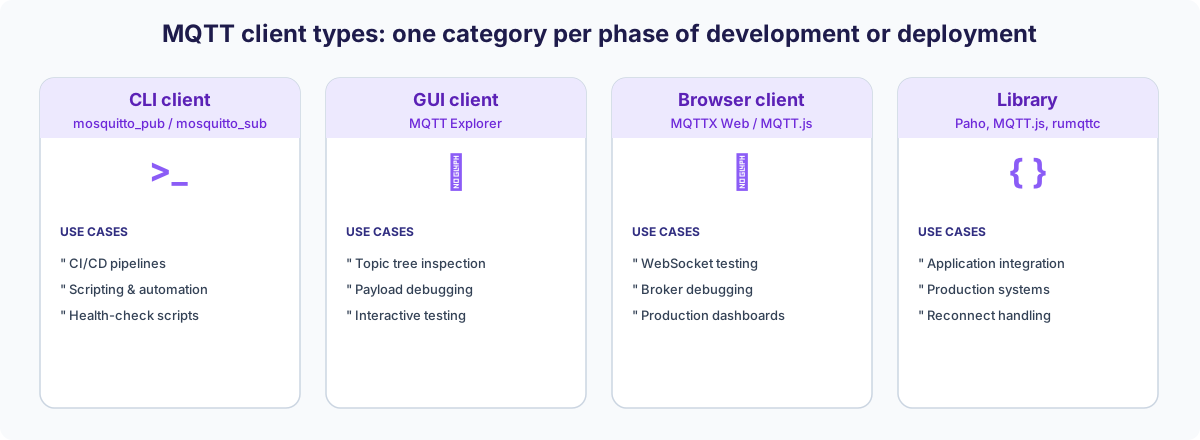
MQTT clients fall into four categories, each targeting a different phase of development or deployment. Mixing up categories is one of the fastest ways to create friction in your implementation.
Command-Line Clients (mosquitto_pub / mosquitto_sub)
mosquitto_pub and mosquitto_sub ship with the Eclipse Mosquitto package and run on Linux, macOS, and Windows. They connect directly to any MQTT broker, publish payloads to a specified topic, and subscribe to topic filters with wildcard support.
Their strength lies in scripting and automation. You integrate them into CI/CD pipelines, health-check scripts, or deployment routines with a single command. For TLS connections, you pass —cafile, —cert, and —key as arguments. A practical setup using both commands is documented in the Mosquitto publish/subscribe guide.
GUI-based MQTT Test Clients
MQTT Explorer and desktop clients like MQTT.fx provide a visual interface for inspecting broker topic trees, examining message payloads, and testing subscriptions interactively. This is the right category when you need to understand an unfamiliar broker topology or verify that a device publishes the correct data structure.
These clients connect to MQTT 3.1.1 and 5.0 brokers and cover most interactive test scenarios without additional tooling, but they are built for interactive use, not automated test suites or production monitoring. MQTT Explorer, the most widely used of them, is also no longer actively maintained.
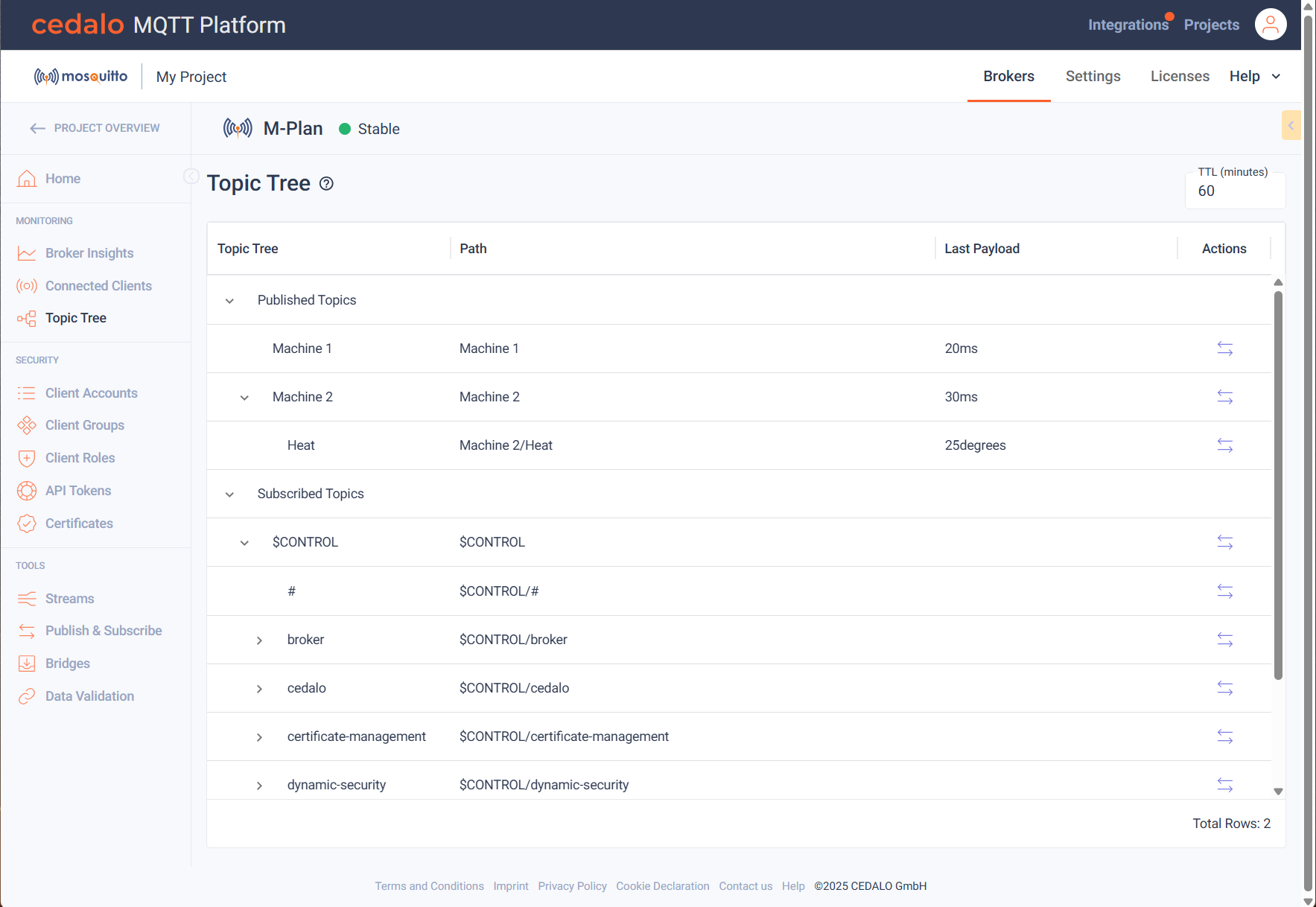
If you already run your broker on the Cedalo Management Center, the same interactive workflow is built in through its topic tree inspection: the live topic hierarchy and message payloads are visualized in the same interface you use for authentication, access control, and monitoring, so understanding broker topology and debugging device data is no longer a separate throwaway tool.
MQTT Web Client and MQTT Browser Client
An MQTT web or browser client runs in the browser and connects to the broker via WebSockets. The broker needs a WebSocket listener; port 9001 is common for testing, while production setups often use WSS on port 443 or another configured port.
MQTTX Web is useful for quick WebSocket tests and broker debugging directly in the browser. It helps verify connectivity, inspect messages, and check topic structures without a local client.
The Cedalo Management Center has a browser-based MQTT client of its own, so operators can publish and subscribe directly from the platform, without installing MQTTX or a desktop client. Its Publish & Subscribe view, shown below, runs entirely inside the Cedalo Management Center:
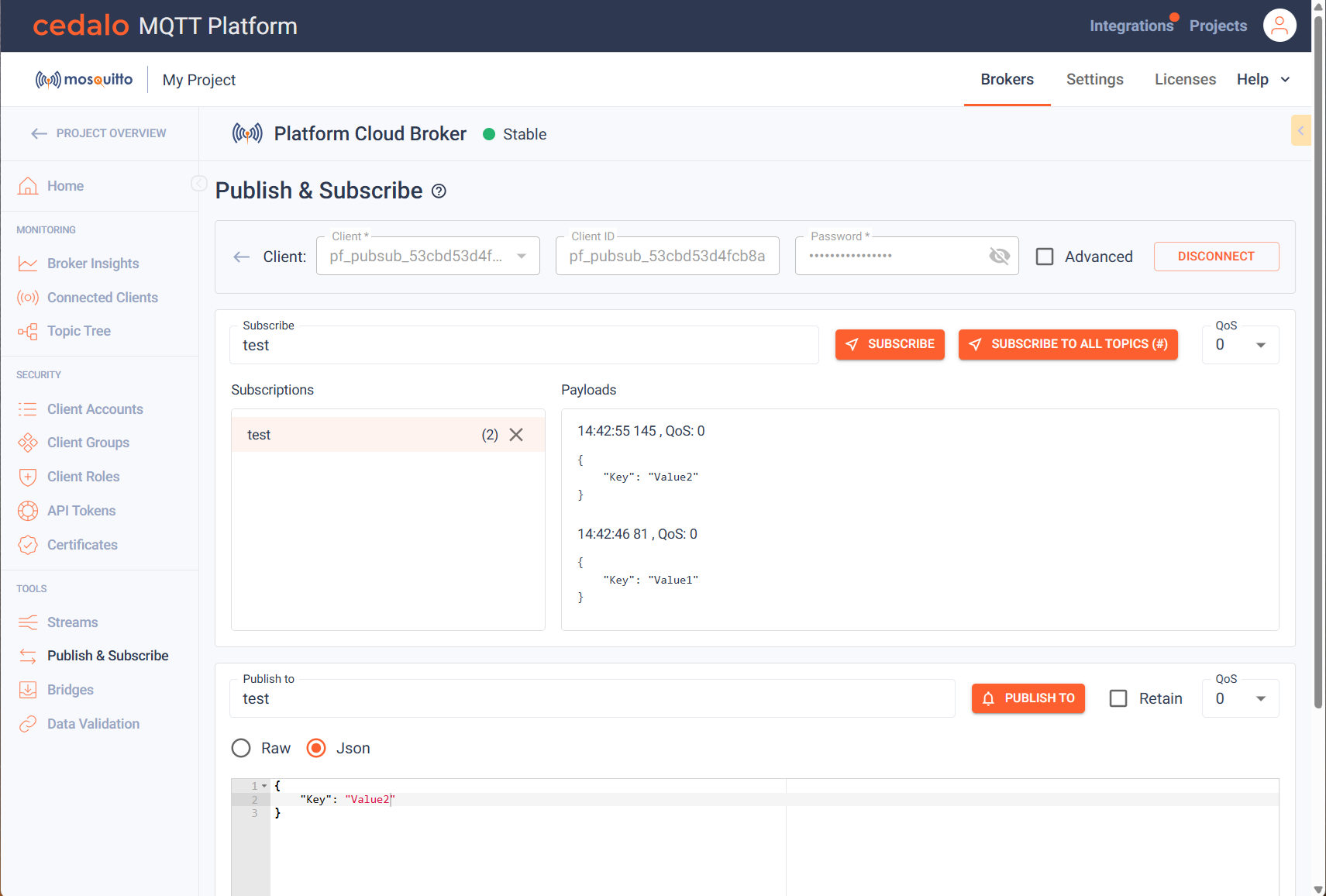
For production browser dashboards, MQTT.js can serve as the client library. Reconnect behavior, subscriptions, authentication, and WebSocket/TLS settings must be configured carefully.
Programmatic MQTT Client Libraries
For any production system, you integrate an MQTT client library directly into your application code. The library manages the TCP connection, handles reconnects, processes incoming messages asynchronously, and gives you full control over session configuration.
The most widely used options by environment:
- Paho (Python, C, Java): mature, well-documented, broad platform support. The Paho Python client guide and the Paho C client setup cover the full configuration for both languages.
- MQTT.js: the standard choice for Node.js and browser-based applications.
- rumqttc (Rust): async-first, performant, and increasingly adopted for edge workloads. The Rust MQTT integration guide walks through the full setup.
- arduino-mqtt: for microcontroller-based devices. The Arduino MQTT setup guide covers the complete configuration, including broker credentials.
- Paho Android: for mobile use cases, the Android MQTT guide provides the full setup with Mosquitto as the broker.
Does an MQTT Client Run on Windows?
Yes, many MQTT clients run on Windows, but TLS, certificates, CLI tools, and local broker setups may require Windows-specific configuration. Practical options include MQTTX as a standalone GUI client, Mosquitto CLI tools installed natively or via WSL, and the Paho Python library for scripting.
TLS is often the main friction point. Certificate paths and CA bundle locations differ from Linux or macOS, and native Mosquitto setups require correct OpenSSL and certificate configuration.
Port 8883 for MQTT over TLS can also be blocked by firewall rules, corporate security policies, or network gateways. Before debugging TLS, test broker reachability with Test-NetConnection -ComputerName
How to Configure an MQTT Client Correctly?
The parameters that cause the most production failures are not obscure. They are the ones developers set once during testing and never revisit.
Connection Parameters: Client ID, Keep-Alive, and Clean Session
Each active client session must use a unique client ID on the broker. In MQTT 5.0, a broker may assign a client ID when the client requests one. Two clients connecting with the same ID can create a disconnect loop. The broker disconnects the first client when the second connects, and vice versa. In distributed systems with auto-generated IDs, add a namespace prefix such as factory01-sensor- to prevent accidental collisions.
Use Clean Session = false in MQTT 3.1.1, or a non-zero Session Expiry Interval in MQTT 5.0, for subscribers that need subscriptions and queued QoS 1/2 messages to survive a temporary disconnect. This does not cover QoS 0 messages, expired messages, or broker-side queue limits. Configure the Last Will and Testament (LWT) on production clients where downstream systems need an offline signal. If the client disconnects unexpectedly without sending a DISCONNECT packet, the broker publishes the LWT message to a designated topic.
QoS Levels: Matching Delivery Guarantees to Your Data
| QoS Level | Delivery Guarantee | Overhead | Typical Industrial Use Case |
|---|---|---|---|
| QoS 0 | At most once, no confirmation | Minimal | High-frequency telemetry (vibration, temperature) |
| QoS 1 | At least once, PUBACK required | Low | Status updates, alerts |
| QoS 2 | Exactly once between the MQTT client and broker, 4-step handshake | Higher | Critical messages that require broker-level duplicate handling and idempotent application logic |
A common misconception is that QoS applies end-to-end across the full application path. In MQTT, the effective delivery QoS is determined per connection leg and by the granted subscription QoS. If a subscriber subscribes at QoS 0, it receives messages at QoS 0 even if the publisher used a higher QoS. Set the subscription QoS to match the delivery requirement of the receiving system, not only the sending one.
TLS Configuration: The Certificate Parameters That Actually Matter
TLS-secured MQTT connections require a trusted certificate chain that the client uses to verify the broker’s identity. Depending on the client and operating system, this trust can come from a CA file, a CA path, or the system certificate store. For mutual TLS (mTLS), the client presents its own certificate and private key, and the broker validates the client certificate.
The three most frequent TLS errors in MQTT clients are:
- Incomplete certificate chain: the intermediate CA is missing from the CA file. Concatenate root and intermediate CA certificates into a single .pem file.
- Hostname mismatch: the broker certificate’s Subject Alternative Name, or in some legacy setups the Common Name fallback, does not match the hostname in the client’s connection string.
- Self-signed certificates without explicit trust: most clients reject them by default. You must pass the self-signed CA explicitly via —cafile or the equivalent library parameter.
Authentication: Username/Password vs. Certificate-Based
Username and password over TLS is a common baseline security configuration for brokers exposed beyond a local network. The credentials travel encrypted, but static credentials create rotation overhead at scale.
Certificate-based authentication (mTLS) gives each client a cryptographic identity. The broker validates the client certificate against a trusted CA without transmitting reusable credentials. This model can scale better in industrial environments where hundreds of devices connect automatically and credential rotation is operationally expensive.
The 4 Common MQTT Client Problems and How to Fix Them
- Connection drops at irregular intervals: the Keep-Alive interval is too short for the actual network latency, or a proxy between client and broker closes idle connections. Increase the Keep-Alive value and configure the client’s reconnect logic with exponential backoff rather than immediate retry loops.
- Certificate validation fails despite correct certificates: check the system clock on the client device. X.509 certificate validation rejects certificates if the system time deviates significantly from actual time. On embedded devices, NTP synchronization is a prerequisite for TLS.
- QoS 1 messages arrive multiple times: the client acknowledges messages, but the PUBACK does not reach the broker before the connection drops. The broker retransmits on reconnect. Implement idempotent message processing on the subscriber side rather than relying on once-only delivery at QoS 1.
- Client ID conflicts in distributed deployments: two services share a client ID across environments because the ID is hardcoded in the configuration. Enforce unique ID generation at startup and log the assigned ID for debugging sessions.
What Changes When MQTT Clients Move Into Production?
Several things change in production. A local test library can fail if reconnect and subscription handling are weak. With persistent sessions, existing subscriptions are restored after reconnect, but retained messages are not automatically re-sent. Verify reconnects, restored sessions, and re-subscription behavior for Clean Session = false or Session Expiry.
Monitor these four client-side metrics in production:
- Connection uptime: tracks how frequently the client reconnects and signals network instability.
- Message publish rate: detects payload spikes that exceed broker throughput.
- QoS 1/2 retry count: high retry counts indicate network instability or broker overload.
- End-to-end latency: measures time from publish to subscriber receipt across the full path.
The Cedalo Management Center shows client and broker information across connected brokers, including connection status, subscriptions, and data transfer statistics. This gives OT and IT teams a shared view of the MQTT infrastructure without relying only on broker logs.
From MQTT Client to Production-Grade Infrastructure
Choosing and configuring an MQTT client is only one part of a stable IoT architecture. The broker behind it determines whether your setup holds under real load, survives network failures, and stays secure as your deployment grows.
Teams that run Eclipse Mosquitto in production know the protocol. What they often hit next are operational requirements such as clustering, centralized monitoring, and enterprise authentication, which are not part of a basic open-source Mosquitto setup out of the box. That is where Cedalo can help.
Your advantages with Cedalo:
- Reduced risk of connection failures at scale: Cedalo’s high-availability features can help maintain MQTT availability during certain node failures, depending on the selected cluster mode and deployment setup.
- Security features for demanding environments: Role-based access control, audit trails, and high-availability clustering support security requirements without requiring teams to build these capabilities from scratch.
- One interface for connected brokers: Connection status, message rates, and configuration across your MQTT infrastructure in one place.
- You stay close to Mosquitto: Cedalo extends the broker your engineers already know, reducing migration and training effort for Mosquitto-based teams.
- Test and inspect without extra tools: A built-in web MQTT client and a topic tree inspector let you publish, subscribe, and watch the live topic hierarchy from the same interface, instead of maintaining a separate desktop client for day-to-day testing.
Most MQTT Deployments Fail at the Broker, Not the Client
A well-configured client still depends on a broker that can hold the connection, restore sessions, and enforce access control under production load. When deployments break at scale, the broker layer is usually where the limits show up first.
Build on a broker that holds under production load
Pro Mosquitto extends Eclipse Mosquitto with clustering, high availability, role-based access control, and centralized monitoring, so your MQTT clients connect to infrastructure that scales with your deployment.
MQTT Client – Frequently Asked Questions
What Is the Difference Between MQTT 3.1.1 and MQTT 5.0 from a Client Perspective?
MQTT 5.0 clients support protocol-level features such as session expiry intervals, reason codes, request/response properties, and user properties that MQTT 3.1.1 does not define. For new projects, MQTT 5.0 gives engineers more control over session behavior, error handling, and message metadata without fundamentally changing the publish/subscribe model.
How Do MQTT Clients Handle Retained Messages After Reconnecting?
The broker stores the last message published to a topic with the retained flag set and delivers it when a client creates a new matching subscription. A client with an existing persistent session does not automatically receive retained messages again for subscriptions that were already present in that session. It receives new matching publications after reconnection, subject to the session, QoS, expiry, and broker queue configuration.
Can MQTT Clients Run Inside Kubernetes or Containerized Environments?
Programmatic MQTT client libraries run inside any container and connect to brokers over standard TCP or WebSocket ports. Two things need attention in orchestrated environments. First, network policy: the container must be allowed to reach the broker host and port, and locked-down clusters often block egress on 8883 by default. Second, client identity across restarts: a pod that restarts with a freshly generated client ID can orphan its previous session or collide with the instance it replaced, so derive a stable client ID (for example from the pod or StatefulSet ordinal) and keep reconnect and re-subscription automatic.
What Is Sparkplug B and Do Standard MQTT Clients Support It?
Sparkplug B is an application-layer specification built on MQTT that defines structured payloads, device state management, and standardized topic namespaces for industrial automation. Standard MQTT clients can publish and subscribe to Sparkplug B topics, but they require additional libraries to encode and decode the Protobuf-based payload format.
How Does the Cedalo Management Center Help When Multiple MQTT Clients Lose Connection Simultaneously?
The Cedalo Management Center displays client connection status across connected brokers, helping make mass disconnect events visible. It can help teams identify affected clients and investigate disconnect patterns without relying only on raw broker logs.
How Does Cedalo Support MQTT Clients Across Multi-Site Industrial Deployments?
Cedalo’s clustered broker architecture can support high-availability MQTT deployments across broker instances, depending on the selected cluster mode and network architecture. For multi-site industrial deployments, cross-site data exchange should be designed around the required availability, latency, synchronization, and bridging or clustering setup.