The CAN bus protocol has connected ECUs in vehicles and machines for decades. Yet for many engineers, the gap between “I know CAN exists” and “I understand why my bus throws CRC errors at 70% load” remains surprisingly wide. Frame anatomy, arbitration, signal decoding, troubleshooting, and connecting CAN network data to modern IIoT architectures via MQTT are all covered here in the depth that practitioners actually need.
CAN Bus: Key takeaways
- The CAN bus protocol uses priority-based, non-destructive bitwise arbitration. Among frames with different arbitration fields, the numerically lowest identifier wins the bus without destroying the winning frame.
- For application-layer decoding, a raw CAN frame mainly provides an identifier and data bytes. DBC files, J1939 PGN/SPN tables, or CANopen object dictionaries transform this data into readable values like engine speed or coolant temperature.
- CAN is bus-local by design and has no native path to cloud, SCADA, or analytics systems. A gateway that decodes CAN frames and publishes structured MQTT messages is a common architectural bridge.
- Cedalo provides the enterprise MQTT infrastructure that makes CAN-derived IIoT pipelines production-ready: Pro Mosquitto adds clustering, TLS encryption, and role-based access control on top of Eclipse Mosquitto, and the Cedalo MQTT Platform manages it with native integrations into Kafka and major cloud platforms.
How does a CAN bus system work?
The Controller Area Network (CAN) is a serial multi-master bus standard whose development started at Bosch in 1983 and was later standardized as ISO 11898. Its design premise is that multiple nodes share a single differential two-wire medium, communicate without a central host, and resolve simultaneous transmissions through arbitration.
Every node connected to the CAN network monitors the bus continuously. When the bus is idle, any node can begin transmitting. If two nodes start simultaneously, the arbitration mechanism determines which message takes priority without either sender losing data.
Classical CAN vs. CAN FD
| Parameter | Classical CAN | CAN FD |
|---|---|---|
| Max. nominal data rate | 1 Mbit/s | 1 Mbit/s (arbitration phase) |
| Max. data phase rate | 1 Mbit/s | Higher than the arbitration phase; commonly 2–8 Mbit/s depending on the controller, transceiver, topology, and physical-layer design |
| Max. payload per frame | 8 bytes | 64 bytes |
| Standard | ISO 11898-1 | ISO 11898-1:2024 includes Classical CAN, CAN FD, CAN FD Light, and CAN XL at the data-link/physical-coding level |
| Typical use case | ECU networking, sensors, PLCs | ADAS, high-bandwidth diagnostics |
CAN bus protocol: frame structure and identifier logic
Every CAN message follows the same fixed frame structure, regardless of the application layer above it. The identifier field within that frame does two things at once: it labels the message and determines its priority on the bus. Understanding both is the foundation for reading bus traces, writing DBC mappings, and diagnosing frame-level errors.
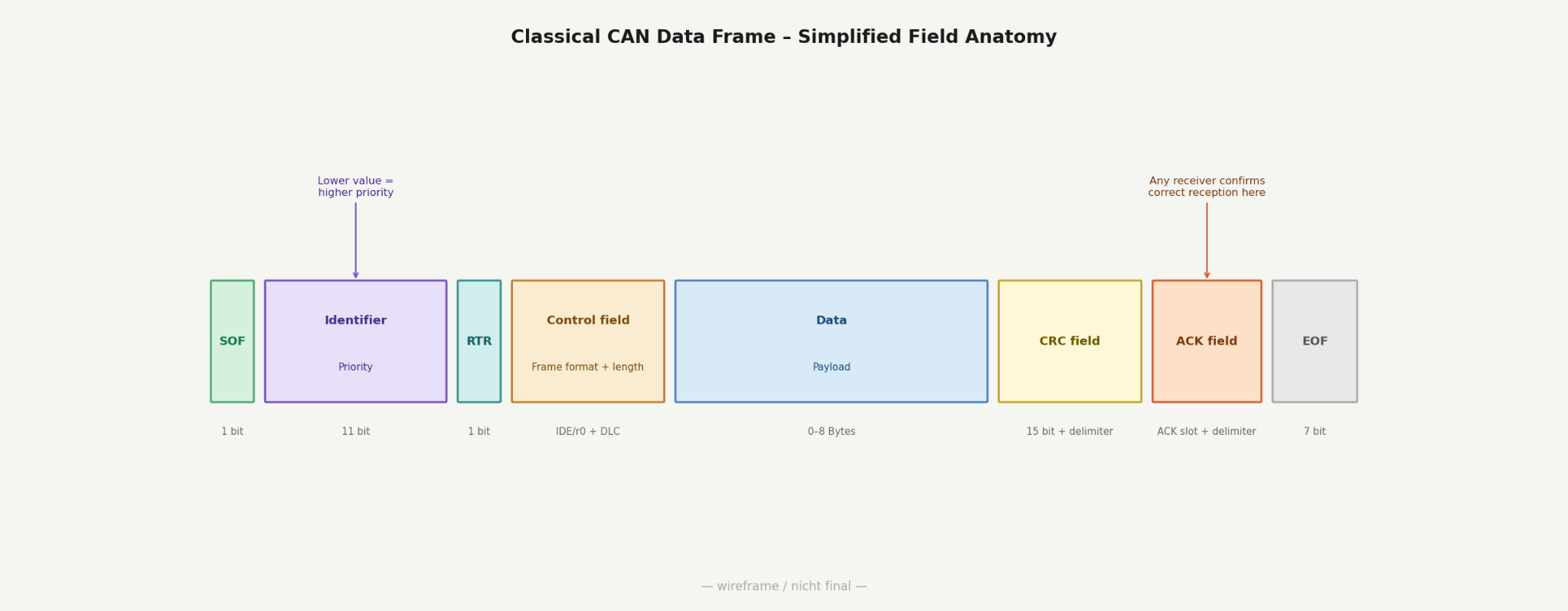
What does each field in a CAN frame do?
A simplified Classical CAN data frame can be described through these functional fields:
- SOF (start of frame): one dominant bit that synchronizes all nodes to the beginning of a new transmission.
- Arbitration field: contains the identifier and RTR bit. The identifier is 11 bits in the base frame format or 29 bits in the extended frame format. A lower numerical value means higher bus priority.
- Control field: contains format/reserved bits and the DLC. In Classical CAN, the DLC indicates 0 to 8 payload bytes.
- Data field: zero to eight bytes of application payload. The content has no meaning without a higher-layer decoding definition.
- CRC field: a 15-bit cyclic redundancy check plus CRC delimiter, used to detect transmission errors.
- ACK field: ACK slot and ACK delimiter. Any node that receives the frame correctly pulls the ACK slot dominant, confirming reception. If the sender reads a recessive ACK slot, it raises an ACK error.
- EOF (end of frame): seven consecutive recessive bits, signaling the end of the frame.
How does CAN bus arbitration prevent collisions?
Arbitration on the CAN bus works through simultaneous bit-by-bit comparison across all transmitting nodes. A dominant bit (logical 0) always overrides a recessive bit (logical 1) on the shared wire. The first node that sends a recessive bit but reads back a dominant bit recognizes that another node holds higher priority, stops transmitting immediately, and waits.
The winning node continues without data loss or retransmission. This non-destructive bitwise arbitration is why CAN handles multiple nodes without collision overhead. Frames with low identifier values always transmit first, which means bus loads above 70 to 80% can cause significant queuing delays for lower-priority messages.
Does differential signaling make the CAN bus electrical layer resistant to interference?
The CAN bus electrical layer transmits data over a differential pair, CAN_H (CAN high) and CAN_L (CAN low). Receivers evaluate only the voltage difference between the two wires, not their absolute levels. This common-mode rejection makes the CAN interface robust against electromagnetic interference typical of factory floors, engine compartments, and high-voltage battery environments.
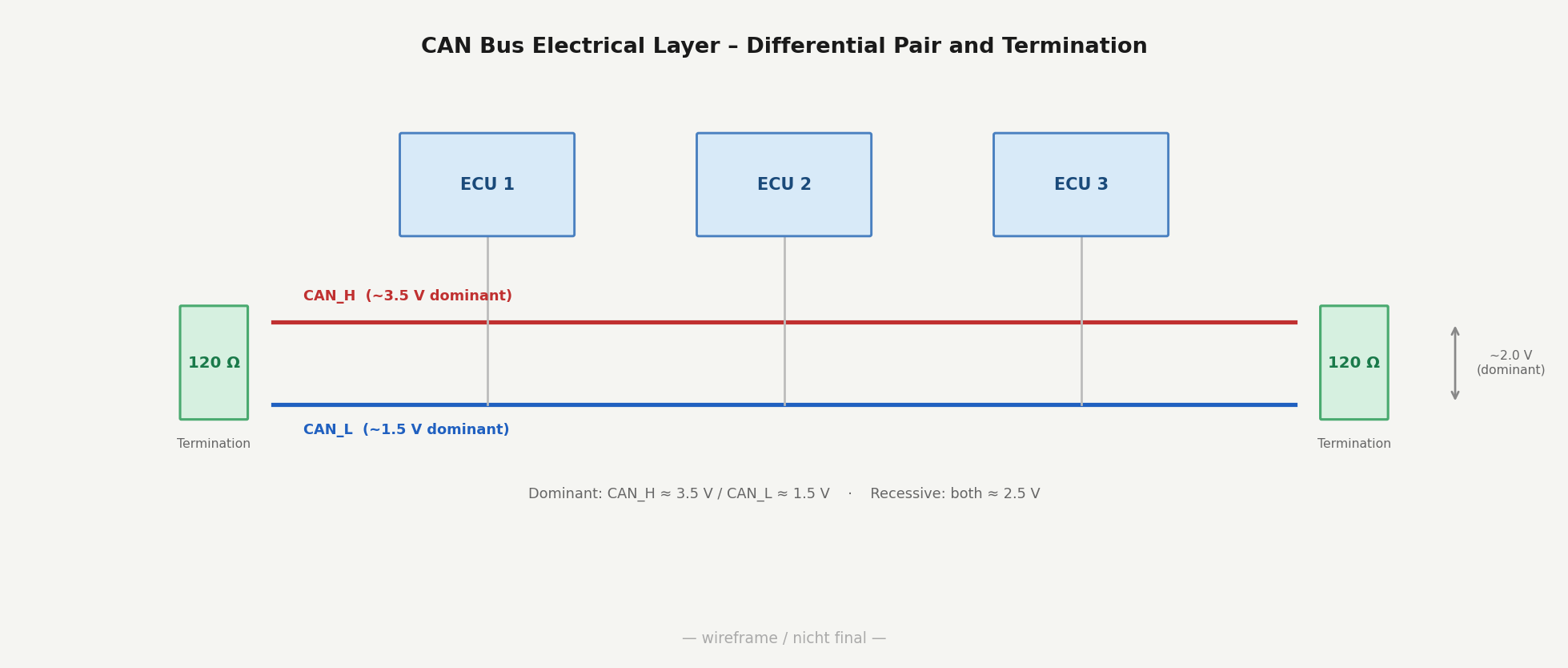
Voltage levels in practice:
| State | CAN_H | CAN_L | Differential voltage |
|---|---|---|---|
| Dominant (logic 0) | ~3.5 V | ~1.5 V | ~2.0 V |
| Recessive (logic 1) | ~2.5 V | ~2.5 V | ~0 V |
The 120 ohm termination resistors at both physical ends of the bus match the cable’s characteristic impedance and prevent signal reflections. A missing terminator at one or both ends is one of the most common CAN bus electrical faults: the bus appears functional under low message load but degrades under high traffic as reflected signals corrupt frames.
Typical CAN bus electrical faults and their effects:
| Fault | Symptom |
|---|---|
| Swapped CAN_H and CAN_L | No or unstable communication; frequent errors due to inverted differential signaling |
| Missing termination at one end | Intermittent CRC errors under high load |
| Missing termination at both ends | Severe reflections, frequent error frames |
| Excessive stub length | Frame corruption at higher baud rates |
| Missing ground reference between nodes | Shifted common-mode voltage, reduced noise margin |
Power down the bus and measure the resistance between CAN_H and CAN_L with a multimeter. A correctly terminated bus reads approximately 60 ohm, which is two 120 ohm resistors in parallel. A reading of 120 ohm indicates only one terminator, and a reading far above 120 ohm indicates no termination at all.
Does a raw CAN frame contain enough information for ECUs to decode network data directly?
A raw CAN frame contains only an identifier and a sequence of bytes, which carry no inherent meaning on their own. A decoding layer that maps payload bits to physical signals with units and scaling is what turns a frame into readable data.
DBC files, commonly used CAN database files, are the standard format for this mapping in automotive development. A DBC file defines which bits in a frame’s payload correspond to which signal, along with the scaling factor, offset, unit, and valid value range. A frame with ID 0x0CF00400 and two payload bytes might encode engine speed across bits 24 to 39 with a factor of 0.125 rpm/bit.
Higher-layer protocols that add standardized signal definitions:
- J1939 (heavy-duty vehicles and construction machinery): groups signals into Parameter Group Numbers (PGN). Individual signals within each PGN are identified by Suspect Parameter Numbers (SPN). Teams integrating truck telematics or agricultural equipment start with standardized J1939 PGN/SPN definitions; proprietary signals may still require OEM or vehicle-specific documentation.
- CANopen (industrial automation): uses an object dictionary with index and sub-index addressing. Process Data Objects (PDO) carry cyclic or event-driven process values. Service Data Objects (SDO) handle configuration and parameterization.
- OBD-II (passenger vehicles): standardized Parameter IDs (PIDs) accessible over CAN, readable by compliant scan tools when the vehicle supports the requested PID.
Regardless of the higher-layer protocol, the transformation from raw CAN frame to interpretable value is the step that separates bus monitoring from actionable data. Without correct decoding, engine_rpm, coolant_temperature, or state_of_charge remain unreadable byte sequences.
CAN bus errors: types, node states, and a diagnostic workflow
Every CAN node tracks transmission and reception errors internally. When error counts cross defined thresholds, the node changes its behavior on the bus, up to the point where it disconnects entirely. Understanding which error types exist, how nodes respond to them, and where to start a diagnosis separates a structured troubleshooting approach from trial and error.
What are the five CAN error types?
| Error type | Detection mechanism | Typical root cause |
|---|---|---|
| Bit error | The sender reads back a different bit than transmitted, except during arbitration and the ACK slot | Bus short, wiring fault, transceiver issue, or severe interference |
| Stuff error | More than 5 identical consecutive bits on the bus | Bit stuffing rule violated, corrupted frame |
| CRC error | The receiver’s calculated CRC mismatches the received CRC | Transmission noise, baud rate mismatch |
| Form error | Fixed-format field contains an illegal bit value | Corrupted EOF or ACK delimiter |
| ACK error | The transmitter reads recessive ACK slot after transmission | No active receivers, missing termination |
Any node that detects an error sends an error flag followed by an error delimiter. This sequence signals all other nodes to discard the current frame.
What are the CAN node error states?
Each CAN node maintains two internal counters: the Transmit Error Counter (TEC) and the Receive Error Counter (REC). These counters determine the node’s participation state on the CAN network:
- Error active (TEC and REC below 128): normal operating state. The node participates fully and sends active error flags to signal faults to other nodes.
- Error passive (TEC or REC ≥ 128, while TEC < 256): the node remains on the bus but sends passive error flags and observes additional delay rules before retrying.
- Bus-off (TEC ≥ 256): the node stops transmitting and no longer participates in normal bus communication. Recovery depends on controller configuration and software handling, typically after 128 occurrences of 11 consecutive recessive bits.
A node that repeatedly reaches the bus-off state is a primary diagnostic target. It points to a serious hardware fault, incorrect baud rate, or persistent interference on the bus segment serving that node.
What broker capabilities make CAN-to-IIoT pipelines production-ready?
Once a gateway decodes CAN frames and publishes structured MQTT messages, the broker layer determines how far the architecture scales.
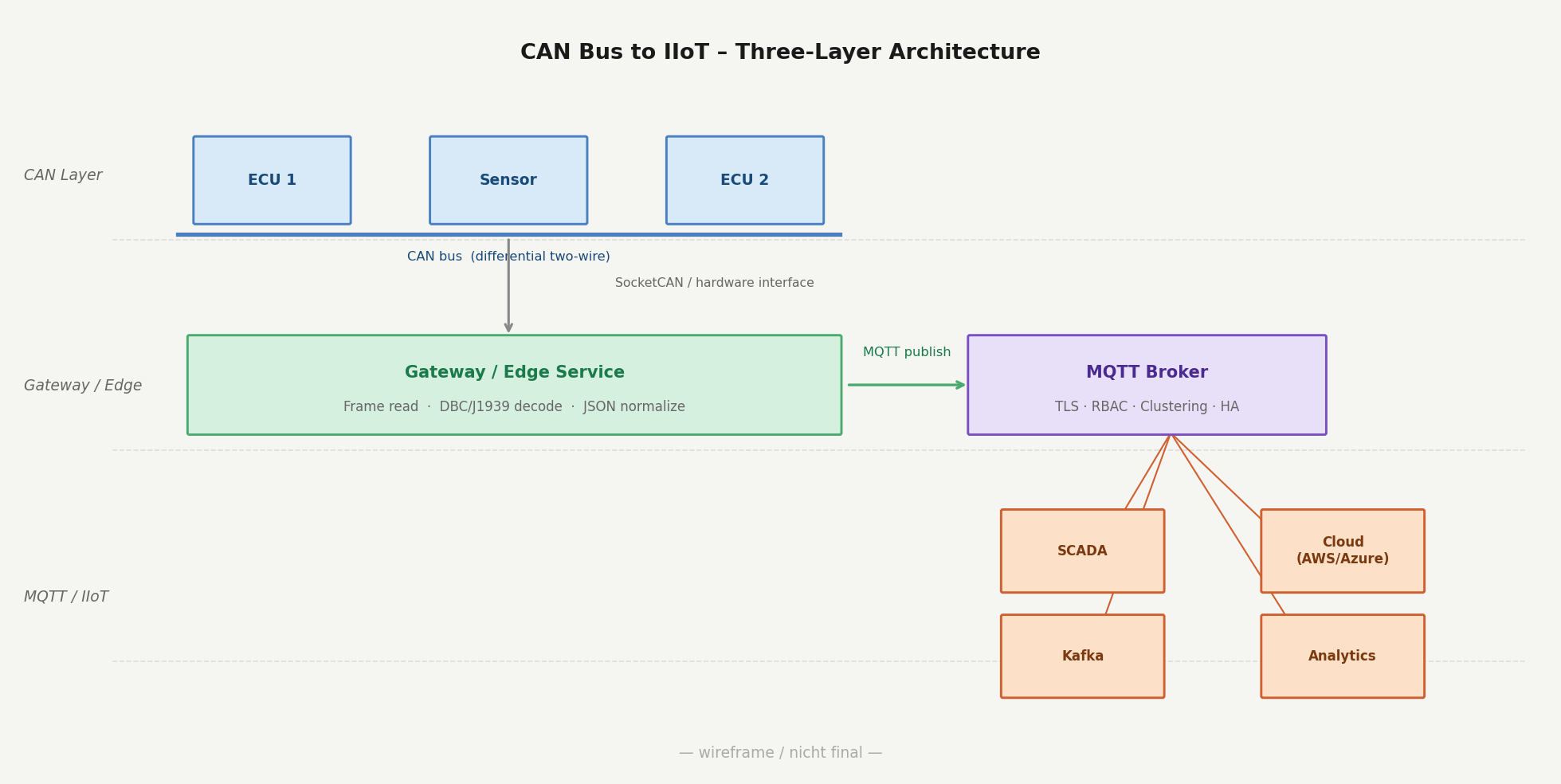
Four capabilities separate a functional proof of concept from infrastructure that holds up in production:
- Security covers TLS and mutual TLS encryption between gateways and the broker, role-based access control for topic-level permissions, and audit trails for connections and permission changes. In regulated industries such as automotive or energy, this traceability is often required by regulation, customer requirements, or internal compliance policies.
- High availability through clustering helps remove single points of failure. Automated failover can keep data flowing when a node goes offline while reducing manual intervention and message loss when QoS, persistence, and queue settings are configured appropriately.
- Observability gives teams real-time visibility into throughput per topic, client states, and message latency. Metrics export to Prometheus or InfluxDB fits into existing monitoring infrastructure.
- Enterprise integrations route CAN-derived MQTT data to streaming pipelines via MQTT-to-Kafka integration and cloud platforms, including AWS, Azure, and Google Cloud, without custom middleware.
The right broker choice at this layer determines how far a CAN-based IIoT architecture can scale.
How teams turn CAN bus data into actionable IIoT intelligence
CAN bus reliably handles fast, deterministic communication between controllers and sensors. The real challenge begins when that data needs to reach cloud systems, analytics platforms, or SCADA environments. That step requires a protocol bridge, a structured MQTT topic design, and broker infrastructure that holds up under production conditions.
Your advantages with Cedalo:
- Enterprise MQTT infrastructure built on Eclipse Mosquitto, a widely deployed open-source MQTT broker used across many installations.
- Clustering and automated failover in Pro Mosquitto help keep CAN-derived data flowing with reduced interruption risk when individual nodes go offline.
- Granular access control, TLS encryption, and audit trails help meet compliance requirements in regulated industries.
- Available integrations with Kafka, major cloud platforms, and selected operational systems help turn decoded CAN data into actionable insights across the organization.
Turn your CAN bus data into actionable IIoT intelligence
Cedalo moves CAN-derived machine data from bus level to cloud, analytics, and enterprise systems: secure, scalable, and based on open protocols such as MQTT.
CAN Bus: Frequently Asked Questions
How many nodes can a CAN bus support?
The CAN specification does not define a fixed node limit, but physical layer constraints typically cap practical deployments at 32 to 110 nodes, depending on transceiver type and bus length. Adding nodes increases bus capacitance, which degrades signal integrity and limits the maximum achievable baud rate.
Does bus length affect the maximum baud rate on a CAN network?
Yes, there is a direct trade-off between bus length and bit rate on a CAN network. At 1 Mbit/s, the commonly recommended maximum bus length is about 40 meters, while 125 kbit/s can support up to roughly 500 meters under suitable physical-layer conditions. Signal propagation delay, topology, transceivers, and cable quality all affect the practical limit.
Is the CAN bus protocol secure against unauthorized access?
CAN has no native authentication or encryption, which makes it vulnerable to spoofing and replay attacks when physical access to the bus is possible. In automotive cybersecurity, ISO/SAE 21434 addresses this at the system level, while industrial environments typically rely on physical access controls and network segmentation.
What is the difference between CANopen and J1939?
Both are higher-layer protocols built on CAN, but they target different industries. CANopen is common in industrial automation and uses an object dictionary for device parameterization, while J1939 is the standard for heavy-duty vehicles and organizes data into PGNs and SPNs. The two are not interoperable at the application layer.
How does Cedalo handle CAN-derived data across multiple sites?
Cedalo’s clustered MQTT infrastructure distributes CAN-derived data across multiple broker nodes, which helps reduce single points of failure and can keep data flowing when individual nodes become unavailable. Teams managing CAN networks across several plants or vehicle fleets can route decoded signal data through one centrally managed MQTT layer with consistent topic structures and access policies.
Can Cedalo integrate CAN bus data with existing SCADA and ERP systems?
Cedalo can connect CAN-derived MQTT data to Kafka pipelines and cloud platforms, including AWS, Azure, and Google Cloud through available integrations. Depending on the target SCADA or ERP system, custom middleware may be reduced or avoided, which can lower integration effort on both the OT and IT side.