
MQTT monitoring shows whether a broker runs reliably, messages are processed reliably, and clients stay connected. In industrial setups, gaps in visibility often become costly outages. This guide outlines the key metrics, tools, and methods that give you immediate clarity over MQTT performance and help you detect issues before they affect production.
MQTT Monitoring: Key takeaways
- MQTT monitoring delivers clear visibility into broker throughput, queued backlogs, client stability, and multi-node deployment behavior in industrial environments.
- MQTT performance monitoring metrics such as throughput, queued message backlogs, publish drops, and session activity help engineering teams detect issues early in large-scale systems.
- MQTT server monitoring that includes host signals, network paths, and TLS behavior improves diagnosis across OT and IT environments.
- Cedalo’s Management Center provides Mosquitto metrics, multi-node operational visibility, and monitoring with audit trails across Pro Mosquitto and Eclipse Mosquitto deployments for industrial workloads.
Why is MQTT monitoring important?
MQTT monitoring is essential when a system transports production data, coordinates machines, or feeds analytics pipelines. A broker can accept connections and still run into queue build-up, message drops, or connection churn that only becomes visible through structured metrics. Clear visibility helps teams catch performance issues before they disrupt uptime or data flow.
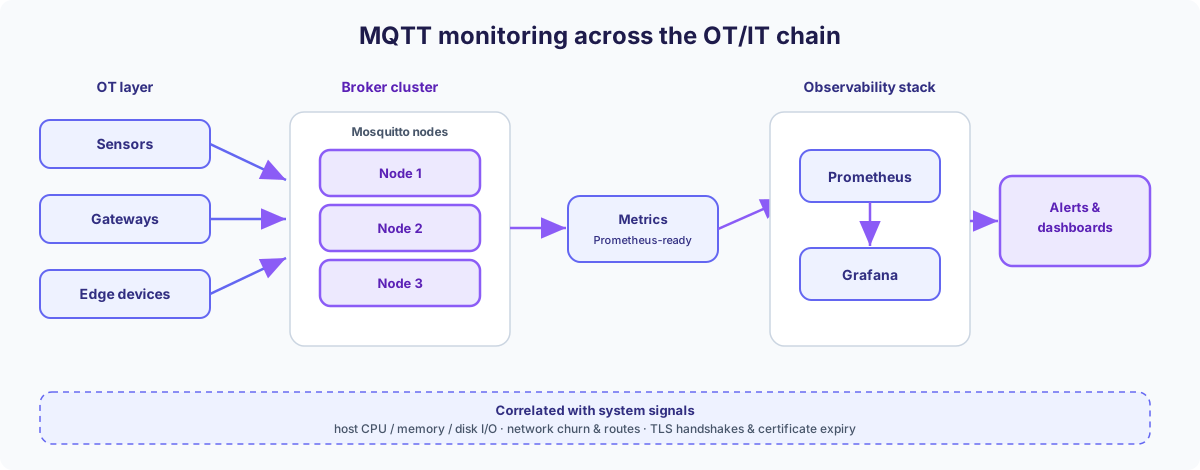
In industrial environments, MQTT sits between OT equipment, gateways, and IT systems. Each layer introduces risks: unstable wireless links, misconfigured clients, uneven topic trees, or overloaded cluster nodes. Without monitoring, these issues only surface once messages fail. With proper metrics in place, teams spot anomalies early and prevent cascading faults.
Typical failure modes that MQTT monitoring exposes
| Failure mode | Impact without monitoring | What monitoring shows |
|---|---|---|
| Slow or congested message flow | Delayed production steps, outdated sensor data | Queue build-up, increasing message backlogs, and publish rate pressure |
| Session flapping | Frequent reconnects, inconsistent device behavior | Connection churn and frequent reconnects |
| Misconfigured or rogue clients | Overload from unusually high publish counters on specific clients or topics | Publish spikes, unusual subscription behavior |
| Cluster imbalance or node saturation | Reduced throughput, unstable failover | Uneven publish counters, queued packets, and publish drops per node |
| TLS or mTLS issues | Security gaps or blocked connections | Certificate errors, handshake failures |
Why does MQTT monitoring matter in industrial and IIoT environments?
- Production systems rely on predictable broker responsiveness and stable message handling; growing queues or publish drops affect machine coordination.
- Gateways and edge devices often face harsh conditions; monitoring highlights degrading connectivity early.
- OT and IT systems run on different protocols and security models; monitoring delivers reliable data instead of assumptions.
- Clustered deployments add operational complexity; monitoring validates node load, queue backlogs, and connection stability during restarts and traffic shifts.
What defines effective MQTT monitoring in professional environments?
Effective MQTT monitoring combines broker-level metrics, client behavior data, and system-level indicators into a single, coherent view. Teams need visibility into how clients connect, publish, and subscribe, how messages flow through the system, and how the underlying infrastructure influences that flow. Strong monitoring focuses on data that predicts failures, instead of only confirming them after they occur.
In professional setups, monitoring must reflect the full OT/IT chain. Gateways, edge devices, networks, and cloud components influence message timing and broker load. A solid monitoring approach highlights weak points across these layers, allowing engineers to respond before problems escalate.
Core principles that guide reliable MQTT monitoring
1. Focus on end-to-end message flow
MQTT monitoring should show queue growth, broker pressure, and broker-side publish drops across the publish and delivery workflow.
2. Track connection stability, not only connection counts
Metrics like keep-alive patterns, session expiry behavior, and churn reveal client misconfigurations or fluctuating networks long before they trigger outages.
3. Integrate broker metrics with system metrics
CPU load, memory pressure, container restarts, or network saturation often explain message delays. Combining these metrics prevents blind spots.
4. Observe configuration-driven behaviors
QoS handling, retained messages, shared subscriptions, topic hierarchies, and MQTT 5 features influence performance. Monitoring should reflect how these configurations behave in practice.
5. Use structured alerting rules with clear thresholds
Alerts should trigger on patterns such as queue growth, rising publish drops, and increasing disconnect events, instead of only reacting to a complete failure.
Key MQTT performance monitoring metrics
MQTT performance monitoring depends on a clear set of KPIs that reveal how many messages the broker processes, how stable client connections behave, and how much load a broker or cluster carries. Strong metrics expose delays, rising drop rates, and unusual connection patterns early, which keeps IIoT environments predictable and stable.
The following KPI groups form the technical foundation for reliable MQTT monitoring. Because the underlying metrics are counters, “rate of …” below means the metric’s per-second increase over a time window, as computed in Prometheus or Grafana.
Throughput metrics for message flow clarity
Throughput shows how many messages a broker processes within a given time window. Sudden spikes or drops highlight overload, misconfigured clients, or unusually high publish counters from specific clients or topics.
| Metric | What it indicates |
|---|---|
Rate of mosquitto_mqtt_publish_received | Publish rate and load pattern generated by devices or gateways |
mosquitto_subscriptions | Shifts in consumer behavior through subscription counters |
mosquitto_mqtt_publish_received / mosquitto_mqtt_publish_sent | Hotspots in message flow derived from publish activity per node |
Broker processing metrics that reveal performance pressure
These metrics show how the broker copes once it is under stress, before problems become visible to clients. Rising values here point to processing pressure, misconfigured clients, or cluster imbalance.
| Metric | Insight |
|---|---|
mosquitto_mqtt_puback_*, mosquitto_mqtt_pubrec_*, mosquitto_mqtt_pubrel_*, mosquitto_mqtt_pubcomp_* | QoS handshake volume and acknowledgment behavior under load |
mosquitto_out_packets, mosquitto_out_packet_bytes | Backlog pressure on each node through outgoing packets and bytes |
Drop rate metrics for stability and reliability
Broker-side drops (mosquitto_mqtt_publish_dropped) increase when PUBLISH messages hit inflight or queued-message limits, often for disconnected durable clients. Sustained drops usually correlate with queue growth and connection problems.
| Metric | Insight |
|---|---|
mosquitto_mqtt_publish_dropped | Messages discarded at inflight or queued limits; rising values signal backlog for disconnected durable clients |
QoS behavior metrics for delivery control
QoS patterns show how reliably a system handles messages under load. Irregular QoS behavior often signals client bugs, disconnect churn, or storage and queue pressure.
| Metric | Insight |
|---|---|
mosquitto_mqtt_puback_received, mosquitto_mqtt_puback_sent | QoS 1 traffic volume and acknowledgment behavior under load |
mosquitto_mqtt_pubrec_*, mosquitto_mqtt_pubrel_*, mosquitto_mqtt_pubcomp_* | Heavy transactional (QoS 2) behavior that stresses storage |
Connection and session metrics for client behavior analysis
Connection patterns show how devices behave in real environments. Many industrial issues come from unstable networks or aggressive reconnect loops.
| Metric | Insight |
|---|---|
mosquitto_sessions / mosquitto_clients_online | Total sessions vs. currently connected clients, the overall client footprint |
mosquitto_clients_expired | Total clients expired due to keep-alive |
Rate of mosquitto_socket_connections / mosquitto_mqtt_connect_received | Reconnect pressure and patterns caused by misconfigured clients |
mosquitto_metric_session_take_over | Session take-overs when a client ID reconnects while a session is still active |
Cluster and high-availability metrics for multi-node setups
Clustered environments introduce complexity. Monitoring must highlight imbalance, node pressure, queue backlogs, and connection stability to avoid performance shifts or inconsistent behavior.
| Metric | Insight |
|---|---|
Per-node mosquitto_mqtt_publish_received / mosquitto_mqtt_publish_sent | Balanced or skewed workload |
Per-node mosquitto_out_packets, mosquitto_out_packet_bytes | Backlog pressure per node under load |
mosquitto_mqtt_disconnect_received / mosquitto_mqtt_disconnect_sent, mosquitto_clients_expired | Connection instability and keep-alive expirations |
mosquitto_mqtt_publish_dropped | Broker-side message drops under pressure |
MQTT monitoring tools in industrial contexts
MQTT monitoring tools need to provide clear visibility into broker performance, client activity, cluster load, and message flow. Industrial environments place strict demands on uptime, compliance, and repeatable operations, which means the tools must combine technical depth with reliable automation.
Broker-native monitoring options
Some MQTT brokers expose their own metrics through APIs or built-in endpoints. These data points help teams track connection counts, publish rates, topic activity, storage queues, and cluster states. Native metrics form the base layer for most monitoring pipelines because they reveal details that generic tools cannot access.
| Source | Insight |
|---|---|
| Status endpoints | Real-time broker load and session counts |
| Internal event logs | Disconnect reasons, ACL behavior, protocol events |
Native sources deliver the most accurate operational signals and should always feed into the broader monitoring setup.
MQTT-friendly observability stacks
Cedalo exposes Mosquitto metrics in a format that integrates directly with Prometheus and Grafana. An InfluxDB metrics exporter is also available. This allows teams to use their existing monitoring and alerting infrastructure instead of relying on broker-native alerting.
Benefits for professional monitoring environments:
- Direct Prometheus integration for Mosquitto metrics
- Seamless use within existing Grafana dashboards
- External alerting based on queue growth, publish drops, and connection churn
- Long-term storage and correlation with host and network metrics
Integrate Mosquitto monitoring into your existing Prometheus and Grafana stack
Cedalo exposes Mosquitto metrics in a Prometheus-ready format, so teams can integrate MQTT monitoring directly into their existing dashboards and alerts.
Integrated monitoring platforms for industrial MQTT
Some platforms focus specifically on MQTT at enterprise scale. They combine broker metrics, cluster visibility, user and role control, audit trails, and message analytics in a single interface. This approach is especially useful for OT and IT teams that manage mixed environments with strict availability and compliance goals.
| Feature | Purpose |
|---|---|
| Cluster-aware monitoring | Clear view of node activity and load distribution |
| Multi-broker oversight | Central control for large distributed setups |
| Audit trails | Tracking of access changes and operational events |
| Threshold-based alerting | Notifications when limits are crossed, natively or through an external stack |
Lightweight MQTT monitors for development and testing
Small tools help developers inspect topics, payloads, and live message traffic during testing. They provide quick visibility into MQTT communication but do not represent monitoring in a production context.
Typical development inspection tools:
- Topic viewers
- Simple message explorers
- Local protocol analyzers
These tools support development and troubleshooting but do not replace structured monitoring pipelines in production.
What should MQTT server monitoring include?
MQTT server monitoring must cover the broker, the host system it runs on, the network paths it depends on, and the security layers that protect it. Many operational issues originate outside the protocol, so a complete view helps teams detect processing pressure, unstable broker behavior, and connection issues before clients fail.
Host and operating system metrics that influence MQTT performance
A broker’s behavior reflects the condition of its host. When CPU, memory, or disk I/O reach their limits, message handling slows and queues grow. These signals reveal pressure long before clients experience delays.
| Metric | Why it matters |
|---|---|
| CPU usage and saturation | Slows packet processing and QoS flows |
| Memory pressure | Triggers queue growth and unstable session handling |
| Disk I/O | Affects persistence for QoS 1 and QoS 2 traffic |
| Process or service restarts | Disrupts sessions and cluster timing |
Stable hosts support predictable end-to-end behavior, especially in edge scenarios with limited resources.
TLS and mTLS signals outside broker-exported metrics
Encrypted connections add computational overhead. Certificate problems, handshake failures, or mismatched configurations often appear as connection churn or reconnect patterns.
Signals to track from logs and certificate management systems:
- TLS handshake failures (log-based)
- Certificate expiration dates (PKI systems)
- Repeated handshake attempts from specific devices (log correlation)
Network monitoring across OT and IT segments
MQTT traffic crosses networks that may involve VPN tunnels, firewalled segments, cellular links, or cloud edges. Instability in these layers appears immediately in MQTT metrics.
| Area | Insight |
|---|---|
| Connection interruptions | Often visible through session churn and reconnect patterns |
| Bandwidth constraints | Leads to queue build-up and rising broker pressure |
| Unstable routes | Causes frequent reconnects and session instability |
Container orchestration effects in Kubernetes and OpenShift
In orchestrated environments, MQTT brokers depend on cluster scheduling, resource quotas, and networking overlays. Activity at this layer can influence message flow even when the broker itself appears stable.
Signals to observe:
- Pod or container restarts
- Resource throttling events
- Node pressure warnings
- Timing of rolling updates or deployments
- Failing readiness or liveness probes
How to monitor clustered and high-availability MQTT architectures
Clustered MQTT setups increase availability and throughput, but they also add complexity. The central question in a cluster is how evenly work is spread: a deployment can look healthy on each individual node and still drift when client distribution or backlog pressure becomes uneven. That makes per-node comparison the focus of cluster monitoring.
How to detect node imbalance and saturation in MQTT clusters
The goal is to spot when a single node carries a disproportionate share of sessions or publish traffic. Comparing the same metric across nodes makes an imbalance visible well before it threatens failover.
| Metric | Insight |
|---|---|
mosquitto_clients_online per node | Identifies skewed client distribution |
Rate of mosquitto_mqtt_publish_received per node | Shows where publish traffic concentrates |
| CPU and memory use (host metrics) | Explains broker queue growth under load |
mosquitto_out_packets per node | First sign of load imbalance |
How to monitor shared subscriptions and load distribution in MQTT systems
Shared subscriptions spread messages across multiple consumers. If distribution becomes uneven, some clients process more data than intended.
What to watch:
- Shared subscription count
- Publish and acknowledgment counters (
mosquitto_mqtt_publish_received/mosquitto_mqtt_publish_sent,mosquitto_mqtt_puback_*) - Disconnect and keep-alive-expired counters (
mosquitto_mqtt_disconnect_received/mosquitto_mqtt_disconnect_sentandmosquitto_clients_expired) - Queued packets and bytes per node
How to track retained messages and topic tree growth in MQTT clusters
Retained messages and large topic structures influence routing, storage, and broker memory and queue behavior.
| Area | Insight |
|---|---|
mosquitto_retained_messages | Shows storage and synchronization pressure |
mosquitto_subscriptions | Reflects routing and storage complexity |
mosquitto_message_store_count / mosquitto_message_store_bytes | Total stored messages and bytes (retained plus queued), the overall store pressure |
How to identify high-availability instability in multi-node MQTT setups
High availability depends on stable node restarts and consistent client reconnections.
Relevant signals:
- Queue backlogs per node (
mosquitto_out_packets,mosquitto_out_packet_bytes) - Broker-side publish drops (
mosquitto_mqtt_publish_dropped) - Connection and disconnect counters (
mosquitto_socket_connections,mosquitto_mqtt_disconnect_*) - Keep-alive expirations (
mosquitto_clients_expired)
How to diagnose MQTT issues quickly
Diagnosis relies on signals that show where processing pressure or disconnect patterns originate. Broker, network, and host metrics together point to the root cause.
How to locate issues at the OT and IT boundary
Issues often arise where OT and IT meet. These patterns become visible when MQTT metrics are combined with network tracing.
| Signal | What it reveals |
|---|---|
Rate of mosquitto_socket_connections | Reconnect spikes when a link or route drops |
mosquitto_clients_expired | Persistent sessions removed after a long disconnection between OT and IT |
Rate of mosquitto_mqtt_connect_received | Repeated CONNECTs during interface or routing handovers |
mosquitto_mqtt_pingreq_received | Missing keep-alive pings hint at silently dropped clients |
OT and IT networks use different technologies, so correlating their signals is often the fastest path to a diagnosis.
How to detect misconfigured clients and rogue publishers
Devices with outdated firmware or incorrect settings can overload a broker. These clients often generate abnormal publish rates, unstable connections, or unexpected topic patterns.
What to watch:
- Devices publishing at unusually high frequency
- Clients that reconnect in short intervals
- Subscriptions to large topic trees without operational need
- Payloads that deviate from expected structures
Patterns like these often expose the true root cause before the broker shows critical symptoms.
How to debug MQTT 5 features and protocol behavior
MQTT 5 adds flexible metadata such as reason codes, user properties, and topic aliases. These features help diagnose issues when used intentionally.
| Feature | Diagnostic value |
|---|---|
| Reason codes | Clear explanation for disconnects and rejections |
| User properties | Insight into client-side routing logic |
| Topic aliases | Visibility into client optimizations |
| Session and message expiry | Clarity on state handling and cleanup |
What best practices create a reliable MQTT monitoring setup?
A reliable MQTT monitoring setup depends on clear architecture rules, consistent topic structures, clean data retention, and well-defined access control. Strong setups keep message flow transparent, simplify alerts, and support stable operations across OT and IT.
Architecture rules for stable MQTT environments
- Use exporters or native broker metrics as a single source of truth
- Separate operational topics from data topics
- Keep cluster metrics accessible in one place
- Record connection and session data at consistent intervals
Handling topic volume, retained messages, and shared subscriptions
- Limit excessive topic depth to avoid routing overhead
- Use retained messages only for state, not for streams
- Keep shared subscription groups balanced across consumers
- Review topic usage regularly to detect unused or problematic paths
Recommendations for metric storage and alerting
- Store throughput, queue, publish drop, and session metrics long enough to detect trends
- Use alerts for rising
mosquitto_out_packets,mosquitto_mqtt_publish_dropped, andmosquitto_mqtt_disconnect_received - Combine broker metrics with host and network data for context
- Track TLS or mTLS handshake patterns for early network insight
Audit trails and role models for controlled operations
- Apply RBAC for all changes in monitoring dashboards
- Keep audit trails for configuration updates and access events
- Use separate roles for operations, development, and security teams
How to structure MQTT topics for maintainable monitoring?
A maintainable topic structure uses consistent naming and clear separation.
- Use device or asset groups as stable prefixes
- Keep event, state, and telemetry data separated
- Avoid wildcard-heavy structures that slow analysis
How to define MQTT monitoring policies for compliance-driven environments?
Compliance setups require traceability and controlled access.
- Track connection events, certificate behavior, and role changes
- Store audit logs consistently
- Use dashboards that separate operational and compliance views
What alerting thresholds work well for MQTT brokers?
Useful thresholds show rising broker load and connection instability early.
- Queue growth above the normal baseline
- Rising publish drops and disconnect counters
- Reconnect spikes above typical daily patterns
Apply reliable MQTT monitoring across industrial and IIoT environments
Reliable MQTT monitoring depends on clear metrics, predictable topic structures, stable host systems, and visibility across OT and IT. When these elements align, message flow stays transparent, cluster behavior remains consistent, and issues can be diagnosed within minutes. A strong monitoring setup protects production processes and keeps large-scale MQTT deployments stable.
Your advantages with Cedalo:
- Clear visibility into broker, cluster, sessions, and message flow
- Centralized monitoring with role control and audit trails
- Stable Mosquitto-based operation for industrial workloads
- Scalable architecture for edge, cloud, and hybrid setups
Strengthen your MQTT monitoring with the Cedalo MQTT Platform
Track broker activity, queue backlogs, and connection stability with Pro Mosquitto and the Cedalo MQTT Platform, built for industrial uptime.
MQTT Monitoring: Frequently Asked Questions
How does MQTT monitoring help prevent unexpected downtime in industrial systems?
MQTT monitoring highlights early signals such as queue growth or session instability before they turn into outages. By correlating broker metrics with network and host data, engineering teams can act long before production workflows are affected.
Which MQTT metrics are most useful for detecting issues in large topic hierarchies?
Large hierarchies often increase routing and subscription pressure, so subscription count, retained message count and bytes, and publish counters are especially valuable. Combined with queue backlog metrics, these signals reveal structural load patterns early.
How can MQTT monitoring improve the stability of edge-to-cloud communication?
Monitoring shows whether edge devices show reconnect churn, keep-alive expirations, or unstable session behavior during network transitions. These insights make it easier to adjust QoS behavior, optimize routing paths, and detect bottlenecks across hybrid environments.
What role does Cedalo play in monitoring large Mosquitto deployments?
Cedalo provides enterprise-grade visibility for Mosquitto setups, including cluster metrics, session data, and operational insights. This helps teams scale their monitoring approach and maintain consistent performance even under heavy load.
How does MQTT monitoring contribute to compliance and traceability in regulated industries?
Monitoring delivers auditable records of client behavior, connection events, and security-related signals. This supports traceability requirements and strengthens operational control across OT and IT layers.
How does Cedalo support monitoring for high-availability MQTT clusters?
Cedalo centralizes Mosquitto metrics across nodes, including queue backlogs, publish drops, and connection stability signals. These insights help teams spot imbalance early and keep multi-node deployments stable during restarts and traffic shifts.